
The migration of on-premises infrastructures to the cloud is often accompanied by a sense of euphoria. Finally, scalability. Finally, flexibility. Finally, cutting-edge services available at the push of a button – along with the assumption that you only pay for what you actually use. But after a technically successful migration, reality often sets in quickly: the first monthly bill.
In our role as software architects, we witnessed exactly this cycle over the past year. We successfully migrated a large on-premises landscape consisting of 22 Spring-based microservices, a massive MongoDB database, and additional supporting services for monitoring and logging to the AWS cloud (see the blog article Leap into the cloud: A migration report from private cloud to AWS). What came afterward was almost more interesting than the migration itself: the phase of consolidation and cost optimization. We had to learn that while “lift and shift” works well, it is rarely cost-efficient right away.
Below, using real data and charts from our project, we show where the cost traps were – and which measures, some surprisingly simple and others more far-reaching, helped us significantly reduce monthly expenses together with our partner devlix. One of our main challenges was a mixed load profile: on the one hand, high peak loads caused by batch processing, and on the other, a constant baseline load driven by real-time processing of global events.
Cost Optimization for EC2 Instances: Sizing and Architectural Choices
One of the biggest levers in almost any cloud infrastructure is compute resources. During a migration, instances are often deliberately oversized “just to be safe” in order to mirror the performance of the previous on-prem servers. However, cloud computing provides the flexibility to do exactly the opposite.
The Overprovisioning Trap
Choosing the right instance size has a massive impact on EC2 costs. We learned that correctly interpreting EC2 monitoring data – especially CPU utilization – is essential for determining the proper sizing.
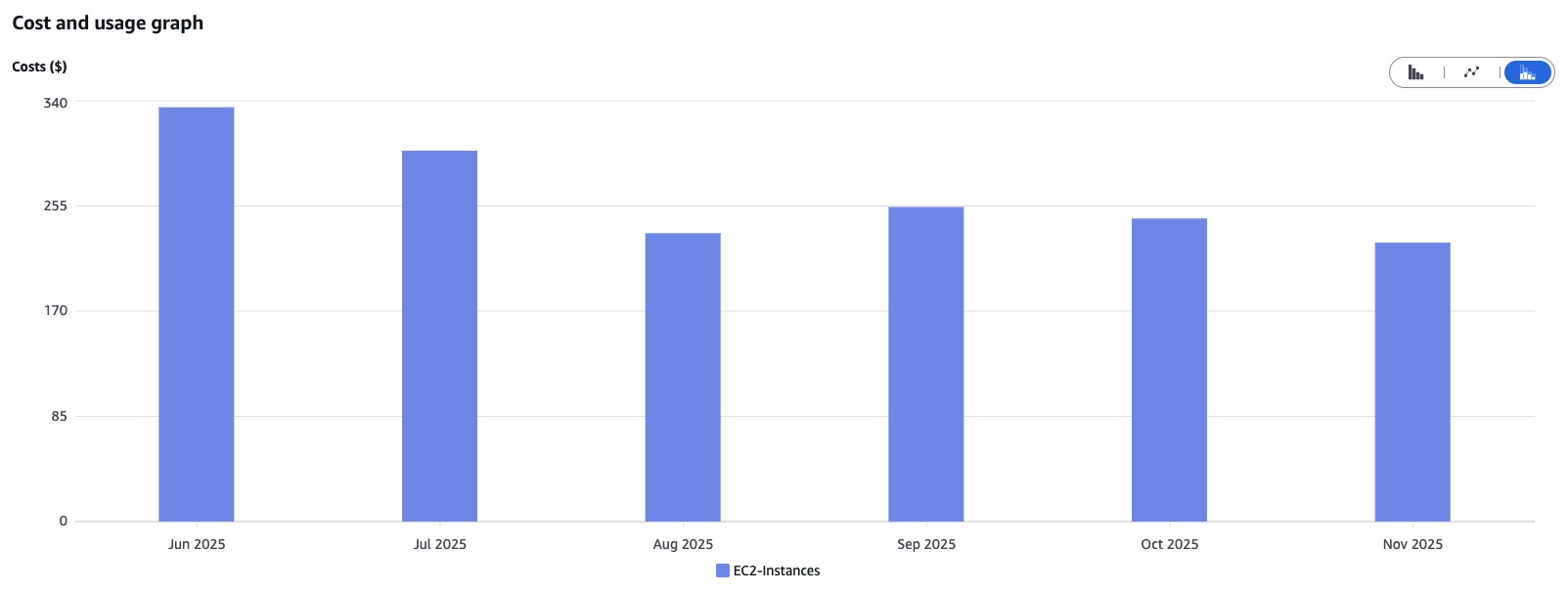
One example from our project: by switching the instance type from m5.xlarge (4 vCPUs, 16 GiB RAM) to t3.xlarge (4 vCPUs, 16 GiB RAM) at the end of July, we were able to noticeably reduce costs. The T series provides low-cost EC2 instances designed for irregular workloads with occasional spikes in CPU demand, while the M series delivers steady, consistent performance for sustained workloads. After carefully reviewing our workload patterns, we concluded that making the switch was the right choice for us.
The Power of AWS Graviton
Another key factor is switching to ARM-based instances, known as AWS Graviton processors. Whenever the software architecture allows it – which is usually the case for modern workloads – Graviton instances offer a significantly better price-to-performance ratio.
A direct comparison of two similar instance types in the eu-central-1 region:
- t3a.large (2 vCPUs, 8 GiB RAM, x86 architecture): ~€0.0737 per hour
- t4g.large (2 vCPUs, 8 GiB RAM, ARM64 architecture): ~€0.0655 per hour
Switching to t4g.large can save around 11% in costs.
Additional Cost Optimization Methods
To save even more, it can be worthwhile to look at EC2 auto-scaling, which automatically adjusts the number of running EC2 instances to match actual demand. In our case, with a rather constant load profile, this approach was less relevant for cost optimization.
AWS Reserved Instances provide significant discounts by committing to use EC2 instances over a fixed period. Since these quotas are managed centrally by our client, we couldn’t access them directly from the project. However, they have a major impact on overall cloud costs for the company.
Our Takeaway: Use metrics to determine the right sizing and choose the smallest instance class that still meets your requirements. Always check whether ARM-based instances, auto-scaling, or Reserved Instances are viable options.
Document DB: The Devil Is in the I/O Details
While EC2 optimizations are often straightforward, with databases like Amazon DocumentDB, costs are frequently hidden in usage patterns. This is where we encountered the biggest surprises – and achieved the greatest successes.
Choosing the Right Instance Size
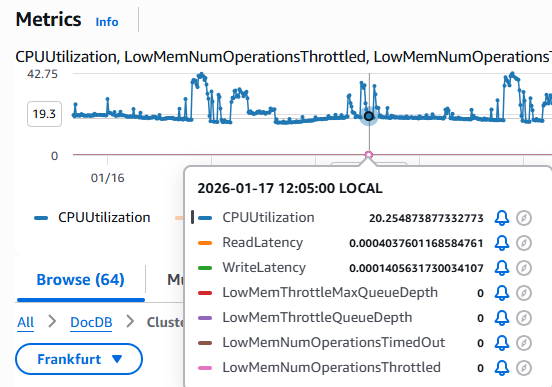
Similar to EC2, selecting the correct instance class is critical for DocumentDB. We initially started with db.r8g.xlarge (4 vCPUs, 32 GiB RAM) for our production workloads, reflecting our previous on-premises setup. Here too, monitoring revealed one clear fact: we were paying for unused capacity.
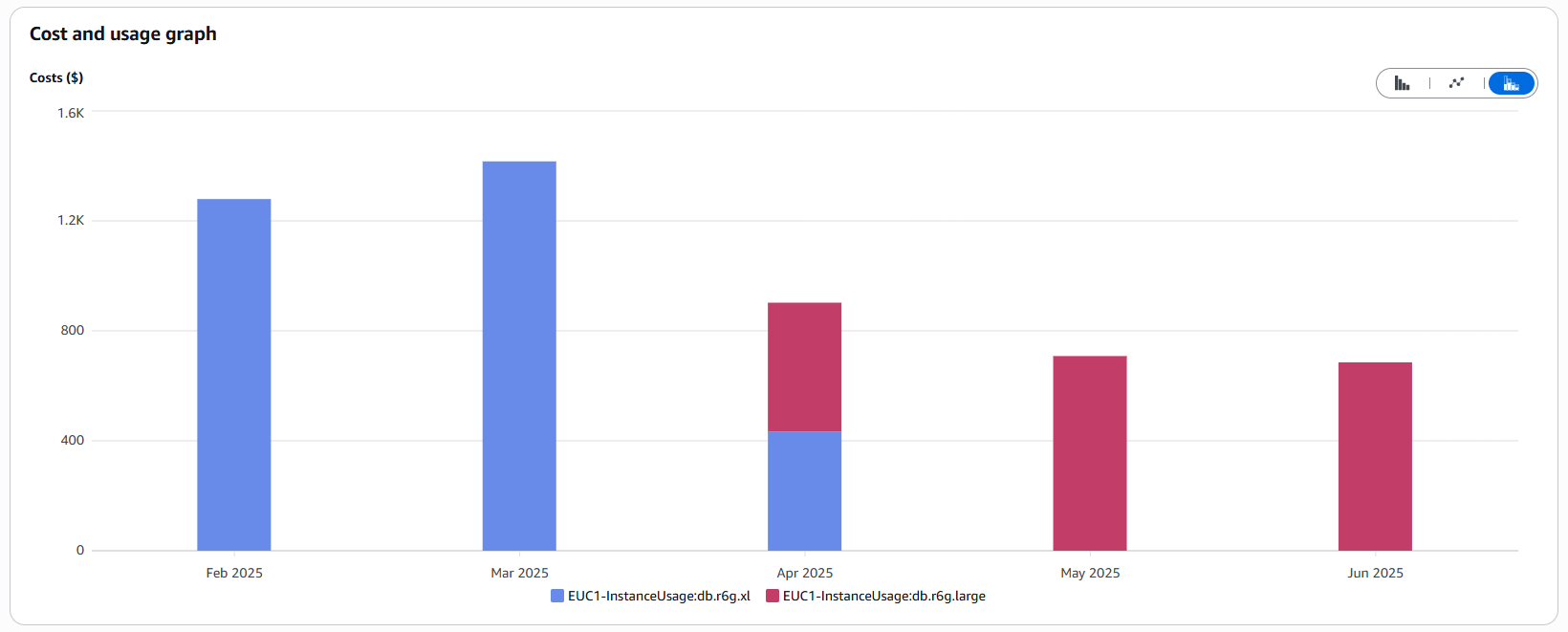
In mid-April, we performed a downsizing to db.r8g.large (2 vCPUs, 16 GiB RAM). As a result, instance costs were nearly cut in half:
Important: Monitor database utilization and peak loads. Choose the smallest instance class that still meets your requirements to avoid paying for unused resources. Always leverage metrics!
The Hidden Cost Driver: Missing Indexes and I/O
Sizing was only half the battle. Starting in April 2025, we noticed that our overall DocumentDB costs kept rising despite the smaller instances. An analysis in the Cost Explorer revealed the culprit: I/O operations.
What had happened? Our database was steadily growing, while queries weren’t using the intended indexes. The result: full table scans. In a small database, this may go unnoticed, but as the database grows with new features, each query requires reading an increasing volume of data from disk. Since AWS charges per I/O operation under the default configuration, costs rise sharply in proportion to data growth:
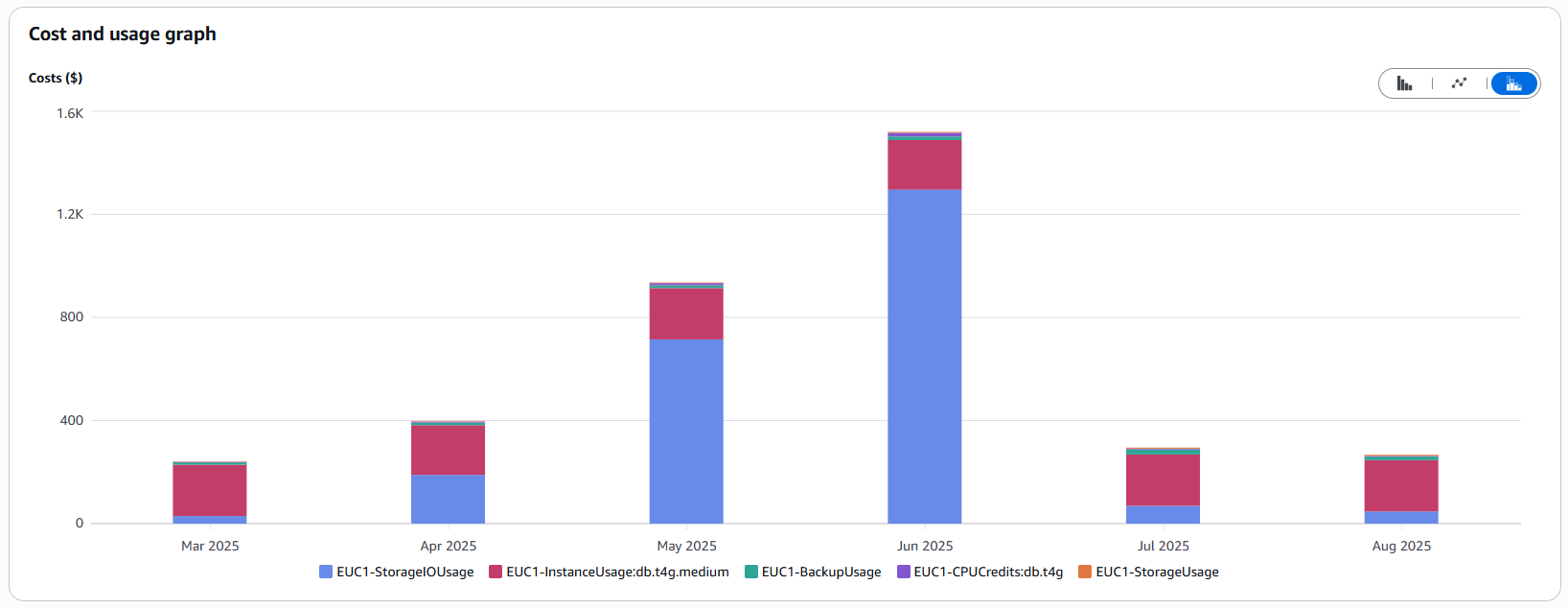
Index Optimization Was the Solution: We analyzed the slow queries, identified those that weren’t using indexes, and created the necessary indexes. This drastically reduced the I/O load.
Choosing the Right Storage Model: Standard vs. I/O-Optimized
AWS offers two storage models for DocumentDB, and choosing the wrong one can be costly:
- Standard: Lower storage costs, but you pay for every I/O operation.
- I/O-Optimized: Higher storage costs, but I/O operations are included (like a flat rate).
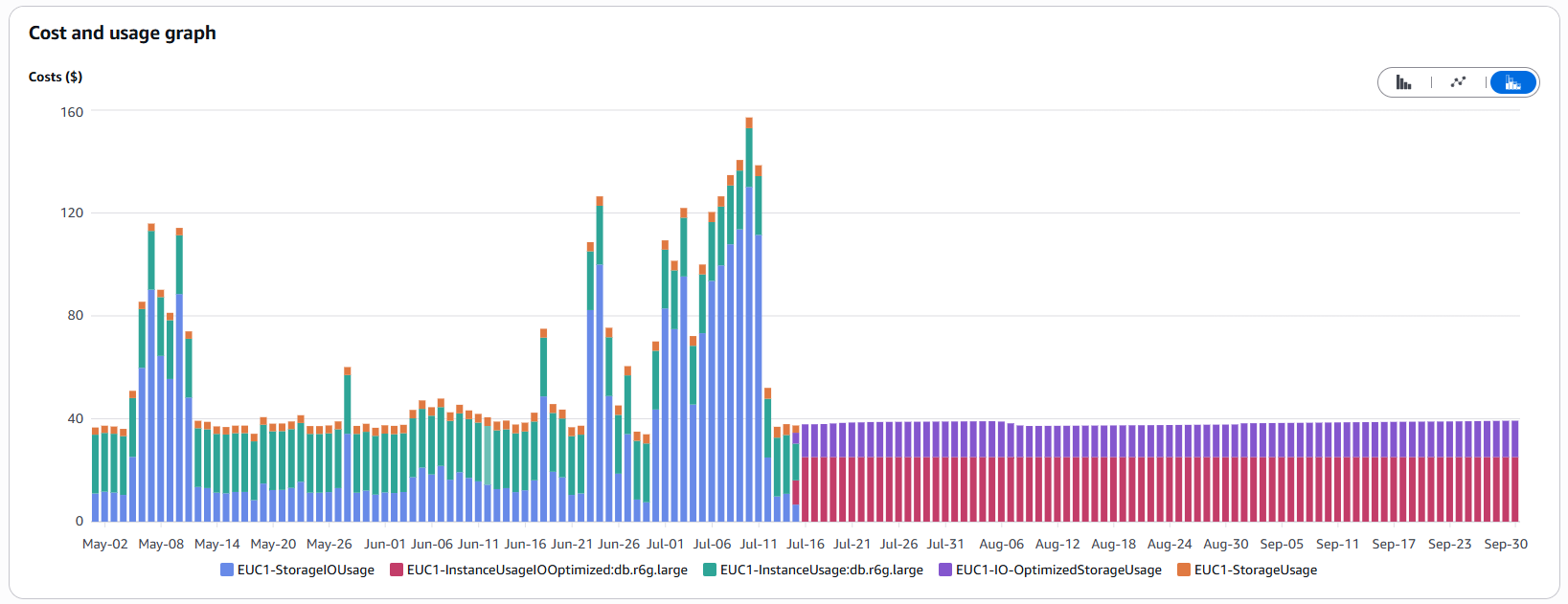
We calculated that for our I/O-intensive scenario – frequent large queries and data migrations – the flat-rate model was worth it. On July 15, we switched to I/O-Optimized. The cost spikes disappeared immediately, and expenses became predictable and stable.
Number of Instances in Non-Prod Environments
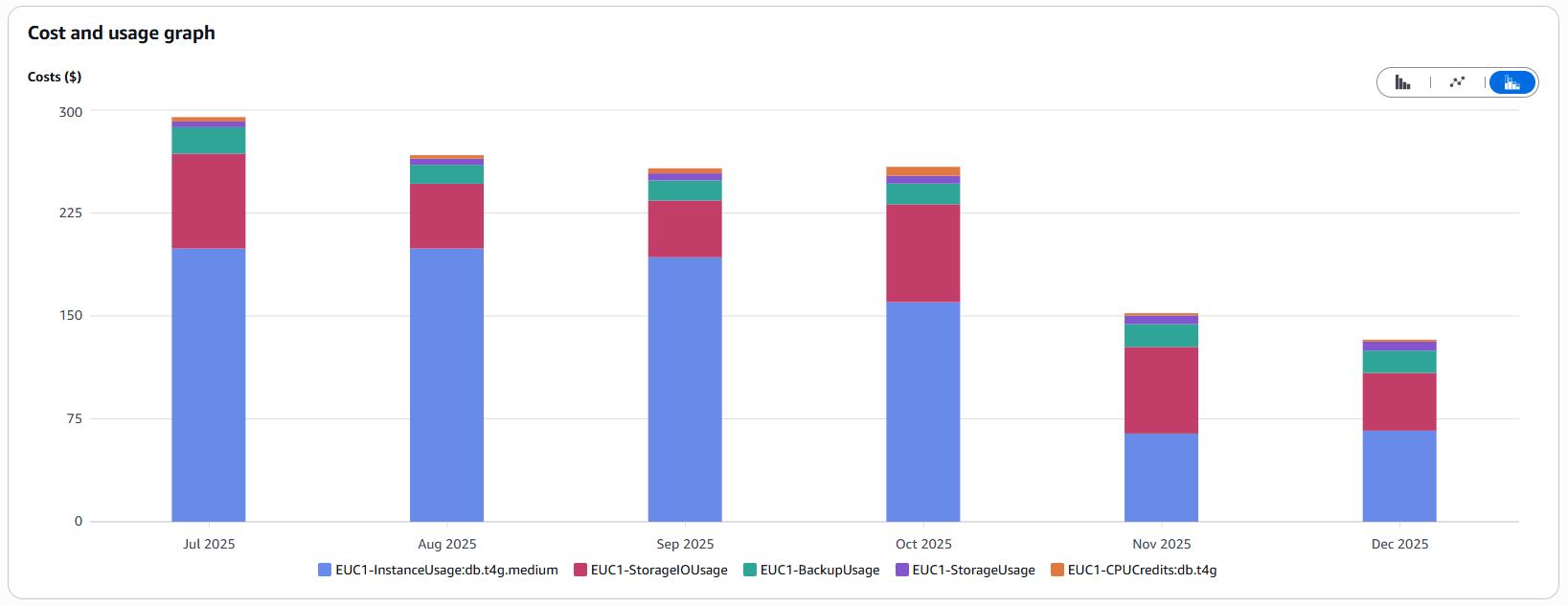
Another “quick win”: high availability is important, but does the development environment really need a three-instance DocumentDB cluster? AWS recommends three instances for production. For our test stages, we reduced the count from three to one on October 22. If the instance fails, developers just have to wait briefly for it to restart – a manageable risk that significantly lowers costs for these environments.
Infrastructure as Code (IaC): Organization Is Half the Battle
Manual interventions in the cloud (“ClickOps”) are not only error-prone but also expensive. We consistently rely on Infrastructure as Code with OpenTofu. Why does this save money?
Equivalent Environments
Thanks to IaC, we can use the same scripts for both the production environment and the test environments. Through parameterization, we ensure that the test environments are architecturally identical to the production environment, but run on significantly smaller (and cheaper) instance types. This saves time troubleshooting issues while simultaneously reducing costs.
In operations, IaC increases resilience, as resources can be easily and quickly redeployed in another region if there are problems with the cloud infrastructure.
Avoiding Orphaned Resources
Large and unnecessary cost drivers are forgotten resources. IaC makes everything traceable:
- Traceability: It is clear exactly who created what and when.
- Complete Cleanup: IaC tools automatically delete all dependent resources (e.g., EBS volumes or Elastic IPs for EC2 instances) when a primary resource is removed, which is easily overlooked with manual deletion.
- Drift Detection: Manually created “shadow resources” are immediately noticeable because they are not defined in the code.
CloudWatch: When Logging Becomes a Luxury
CloudWatch is a powerful tool, but it can quickly become one of the largest cost drivers on your bill if used without caution.
The Cost of Curiosity (Log Insights)
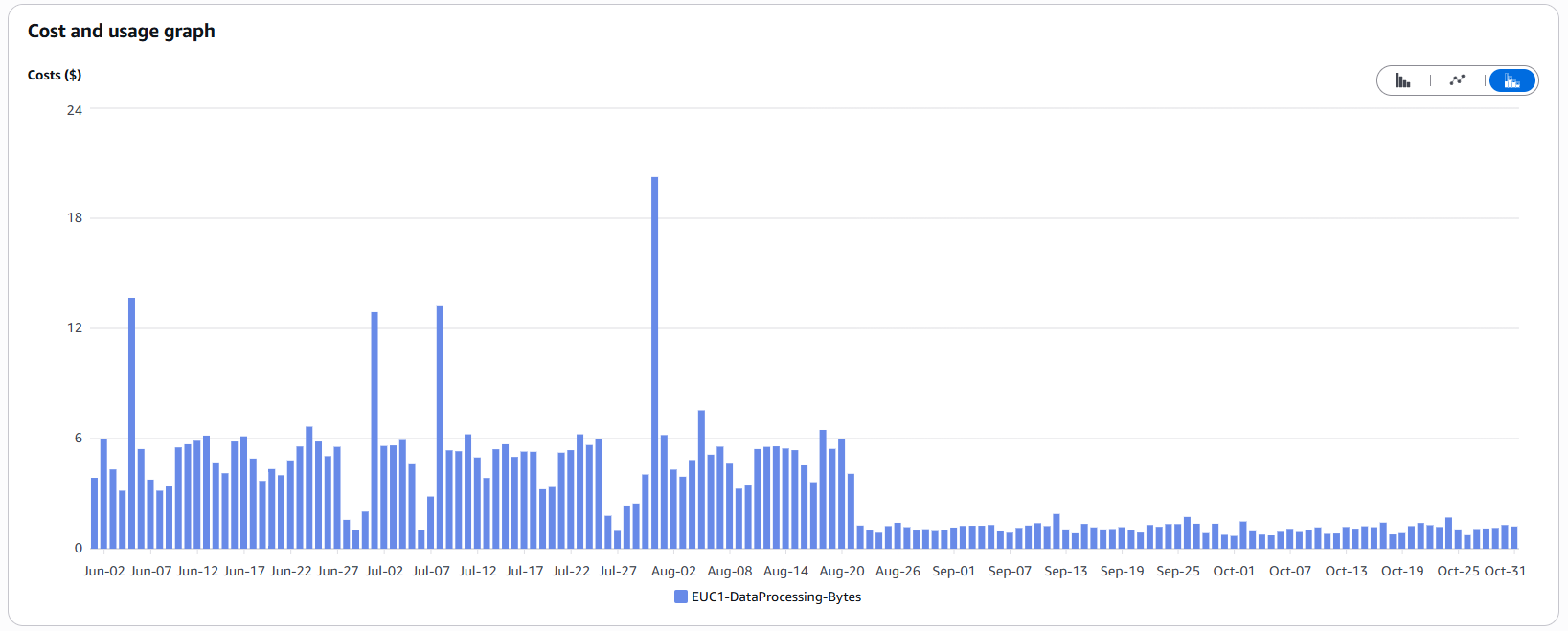
Many teams don’t realize that CloudWatch Logs Insights charges per gigabyte scanned (usually around $0.005 per GB). That doesn’t sound like much, but when terabytes of logs are scanned without tight time filters, those cents add up with every query.
In development teams, it’s common to instinctively select long time periods (“last 4 weeks”) or search across multiple massive log groups simultaneously.
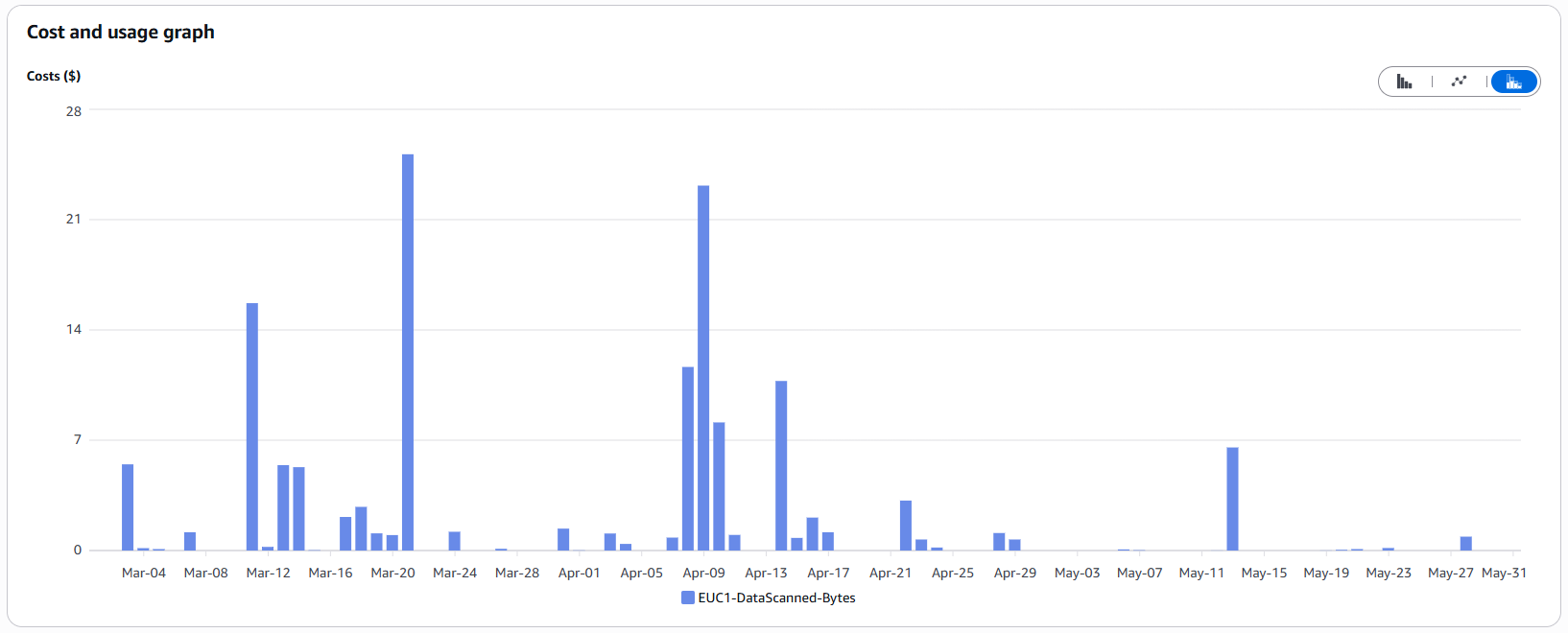
The spikes in the chart above directly correlate with days when intensive troubleshooting took place.
Our Tip: Raise awareness within your team. Using a highly restrictive search filter (e.g., filtering only for ERRORs) doesn’t reduce the amount of data scanned – it only limits the results. Only restricting the time range or the log streams being searched actually reduces the gigabytes scanned and, therefore, the costs.
Reducing Log Volume
Even more effective than querying efficiently is preventing unnecessary data from being generated in the first place. CloudWatch charges not only for querying logs but also for writing/processing them.
When we noticed the high costs, we implemented the following measures on August 21:
- Adjusting Log Levels: We reduced the log level for some frequent but less critical logs. Depending on the environment, these logs are only written when the logger’s level is lowered for analysis purposes.
- Removing Unnecessary Log Statements (“Noise”): Eliminating logs that provide no diagnostic value.
- Reviewing Frequently Repeated Logs: Evaluating whether repeated logs are truly necessary.
- Setting Log Retentions: Ensuring old logs are not retained indefinitely.
These adjustments significantly reduced the volume of written logs – and, consequently, the associated costs:
Trusted Advisor: The Automated Advisor
Sometimes the simplest solutions are right at your fingertips. AWS Trusted Advisor is an often-overlooked tool available in every account (feature availability varies by support plan).
It provides automated Cost Optimization Checks. For example, it can identify:
- EC2 instances with very low utilization (<10% CPU over several days)
- Unused Elastic IPs
- Idle Load Balancers
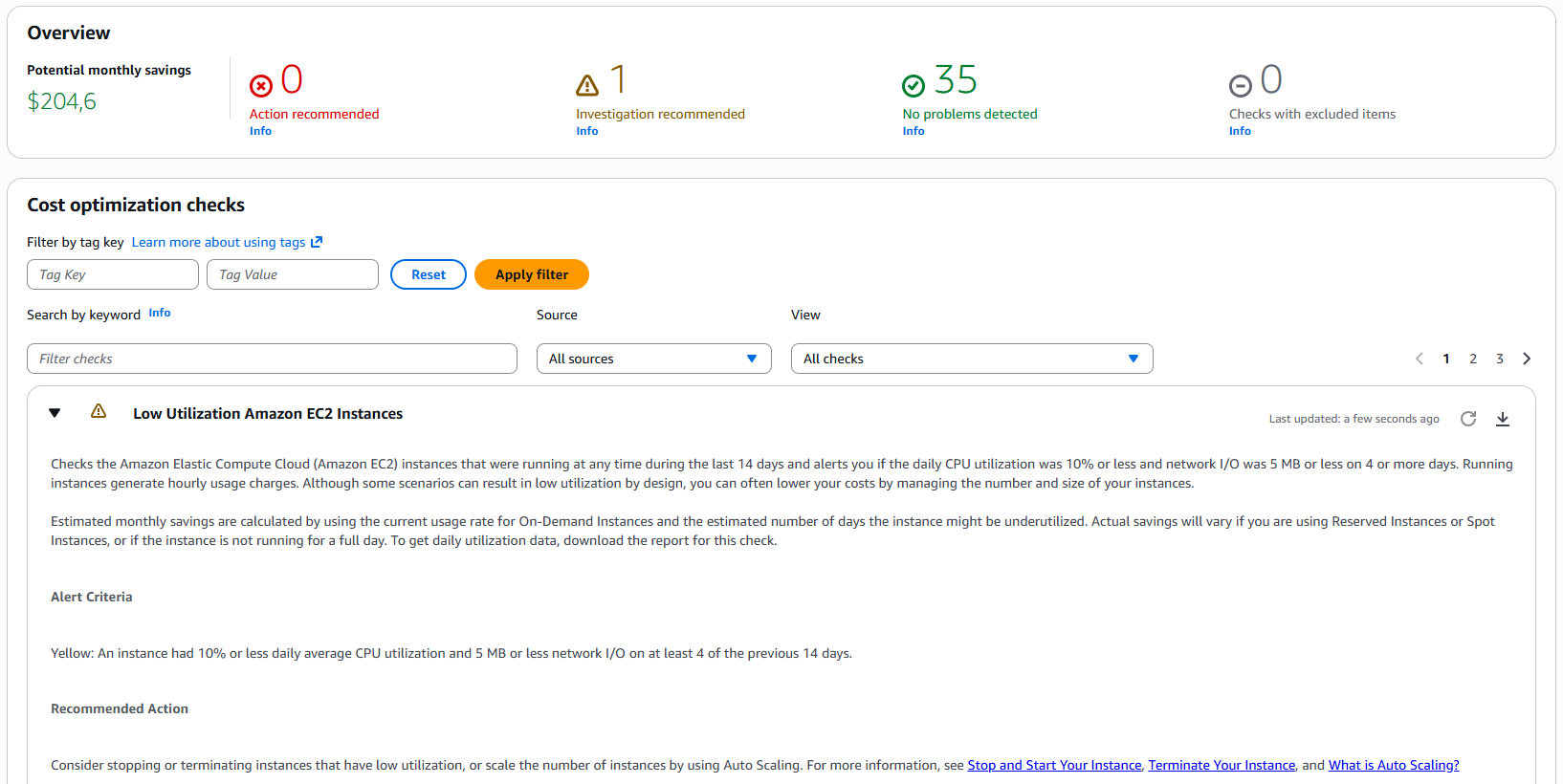
In our case, Trusted Advisor highlighted a potential savings of over $200 per month, primarily from oversized instances. It’s worth incorporating this check into a weekly or monthly routine.
Elastic Container Registry (ECR) Lifecycle Rules
A stealthy cost driver we discovered in the Cost Explorer is ECR. Costs increase linearly. The reason: our CI/CD pipelines build new container images for every release and every deployment (including test environments) and push them to the registry. We currently retain old images that are no longer needed after a newer release is deployed.
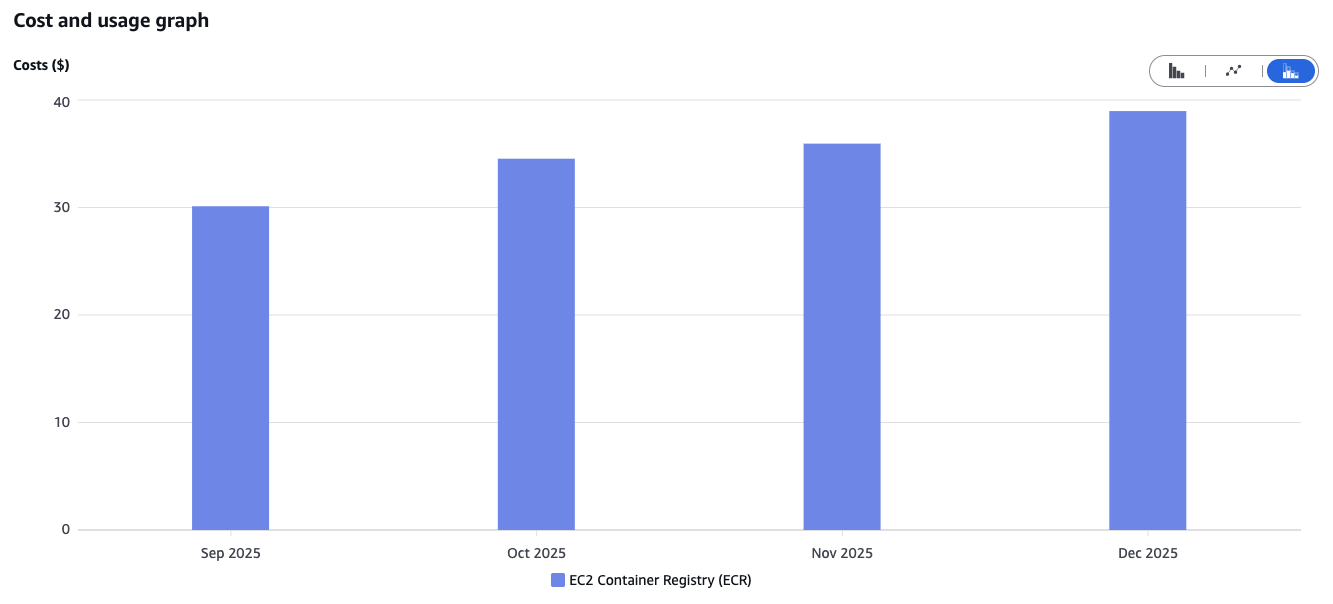
The solution is simple – but you have to know it: Lifecycle Rules. Here, you can define custom rules, such as automatically deleting untagged images after one week. The result is a clean registry and stable storage costs.
Idea: OpenSearch as an Alternative to CloudWatch?
Cost optimization never stops. Once standard measures are in place, it’s worth getting creative and questioning established architectural decisions.
With the CloudWatch cost optimizations, we achieved good results. Still, we propose the following hypothesis: would a self-hosted OpenSearch instance (or the managed service) be cheaper than CloudWatch Logs?
The idea is to stop streaming application logs – which are our biggest cost drivers – to CloudWatch and instead store them in a self-hosted OpenSearch cluster. Our rough calculation shows that relevant costs still arise, as we need to pay for compute and storage for the cluster. However, beyond a certain log volume, the “flat-rate” model of a cluster becomes cheaper than CloudWatch’s “pay-per-GB” pricing.
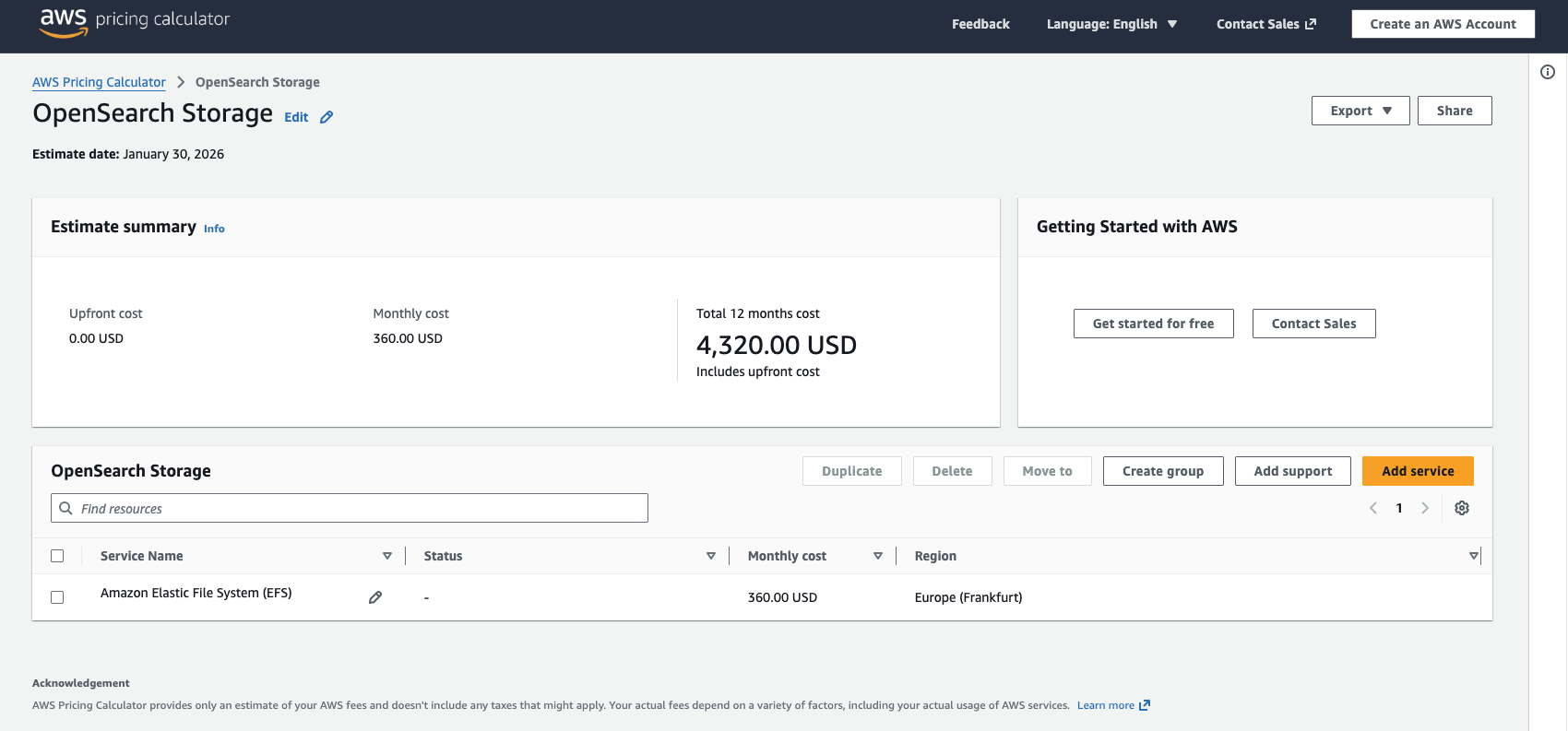
This scenario must be calculated individually (the AWS Cost Calculator is helpful here), but it shows that even managed services can and should be questioned.
Conclusion
Our project experience shows that significant savings can be achieved by following these principles:
- Measure, Don’t Guess: Use CloudWatch metrics to determine the right sizing.
- Understand Your Architecture: Whether it’s ARM processors, database indexes, or storage flat-rates – the technological choices have a major impact on cost.
- Leverage Automation: IaC prevents “cloud clutter” and ensures lean environments.
- Be Consistent: Check the Cost Explorer and Trusted Advisor monthly to spot trends early, like with ECR. Cost monitors and alerts can also protect against unexpected spikes.
- Raise Team Awareness: Everyone on the development team should understand that an unconsidered log statement or inefficient query directly affects the bill.
- Proportionality: Cutting costs at any price is not effective. Identifying major savings opportunities and focusing on them is more productive than chasing every single dollar.
The journey to the cloud is worthwhile – its flexibility and speed are hard to beat. But it requires a new level of awareness. As software architects, we are no longer responsible just for code structure, but also for resource efficiency. At the end of the day, an efficient architecture is always a cost-effective architecture.