Imagine giving someone a task: "Find out which sensors are installed in our manufacturing system and write a brief summary." The person is exceptionally intelligent, speaks seven languages fluently, and has an impressive breadth of general knowledge. On the other hand, they have virtually no short-term memory and no clear sense of the sequence of steps required to complete the task. What they do have is an incredible amount of creativity.
They'll probably come up with something. Or maybe, halfway through, they'll suddenly decide they've lost interest in the assignment and–being wonderfully creative–instead write a poem about butterflies.
If you recognize a bit of yourself in that description, you're in good company. Many of us know what it's feels like to be highly capable and creative while occasionally struggling with focus or the order in which things should be done. Large language models are surprisingly similar in that regard–with one crucial difference: humans develop their own, often ingenious strategies for managing these challenges. Language models, however, need more guidance. They need a framework
The Problem: An LLM Alone Does Not Make an Agent
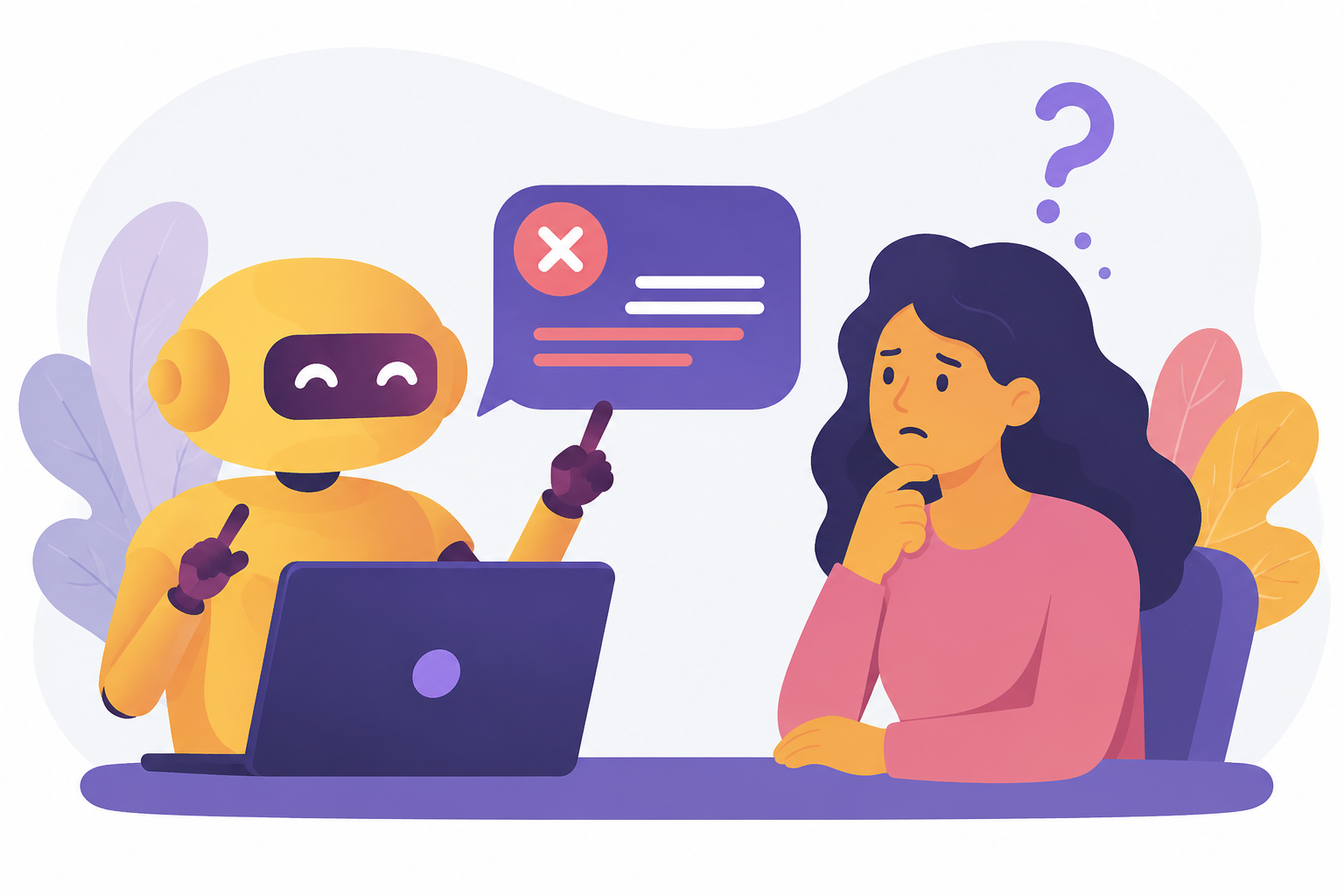
Large language models (LLMs) such as GPT, Claude, or Llama are impressive. They can analyze texts, write code, and answer questions. But an LLM is, at its core, just a very intelligent (or seemingly intelligent) conversational partner–not an agent. The difference? An agent takes action and interacts with its environment. It calls APIs, searches databases, validates results, and decides how to proceed based on intermediate outcomes.
The problem is that simply putting an LLM into a loop and giving it access to tools does not provide enough structure. There is no predefined workflow, no error handling, and no persistent state that remains available beyond individual interactions. There is only the context window as the best possible approximation of a state. And when something goes wrong? The agent does what it has been doing all along: improvising. It either starts over from scratch or simply does something else.
This is roughly equivalent to replacing a factory production line with a group of highly motivated robots that are each brilliant at their individual tasks–but have no shared schedule or coordination mechanism.
For a prototype running on your own laptop, this approach may be sufficient. For a production-grade application–such as planning manufacturing systems, as explored in the research project GENIUS, which works with real-world data and the expertise of human specialists–we need something better: something more reliable, structured, and predictable.
LangGraph: The Roadmap for AI Agents
This is exactly where LangGraph comes into play. LangGraph is an open-source framework from the LangChain ecosystem that is built around a simple yet powerful idea: AI agents are modeled as directed graphs.
Instead of giving an LLM complete freedom, we define a graph consisting of nodes and edges. Each node represents a specific step in the workflow–an LLM request, a database query, or a validation process. The edges define which step follows which. These transitions can be conditional: depending on the outcome of a step, the workflow can branch in different directions.
If this sounds familiar–yes, this is essentially a state machine. However, it is one specifically designed for AI agents and enhanced with several crucial additional capabilities.
The Building Blocks: Nodes, Edges, and State
Let's take a closer look at the core concepts of LangGraph without getting too theoretical.
StateGraph
The graph is the big picture–the blueprint where all the other building blocks come together. In LangGraph, it is called a StateGraph, and it is exactly what the name suggests: a directed graph that carries a typed state through a sequence of processing steps.
You can think of it like a subway map: there are stations (nodes), connections (edges), and a train (the state) moving through the network. The graph defines which stations exist, how they are connected, and at which switches the train takes one direction or another depending on the current situation.
Once the graph is compiled, it becomes an executable application that can be started, paused, and even resumed from where it left off.
State
The state is the agent’s memory–more specifically, its short-term memory. Everything that needs to be passed from one step to the next is stored in the state. This can include the conversation history, intermediate results, error counters, or user input–in short, anything that is relevant for the current task execution.
In LangGraph, the state is defined as a typed object. In Python, it might look something like this:
from typing import Annotated, TypedDict
from langgraph.graph.message import add_messages

class State(TypedDict):
    messages: Annotated[list, add_messages]  # conversation history
    sparql_query: str                         # latest query
    error_count: int                          # error counter for retries
Each field is typed–the error counter is anint, the query is astr, and the messages are a list with a specific merge strategy. If something does not match, the issue is detected during development rather than only at runtime.
Nodes
A node is a function that performs a discrete task. This can be an LLM call, validation logic, a database query, or a data transformation. Each node receives the current state, processes it, and returns (or passes on) the potentially modified state to the next step–the next (sub-)task in the workflow.
Edges
Edges connect nodes and define the workflow. There are simple edges (“step A is always followed by step B”) and conditional edges (“after step A, proceed to step B if the result is valid–otherwise return to step A for another attempt”or “depending on the LLM’s response, continue with B, C, or D”).
This combination of typed states, clearly defined processing steps, and a controllable workflow is what sets LangGraph apart from a simple “LLM in a loop.” It provides transparency, control, and the ability to debug and reproduce the agent’s behavior.
Why Not Just Use LangChain?
A fair question. After all, LangChain is the more well-known framework and comes from the same ecosystem. LangChain is excellent for linear workflows: prompt in, response out, perhaps with a tool call in between. For many use cases, that is perfectly sufficient.
However, once things become more complex–when decisions, loops, multi-agent collaboration, error handling, and the ability to resume interrupted workflows come into play–LangChain starts to reach its limits. LangGraph was designed specifically for these scenarios and provides the right level of abstraction: low-level enough to maintain full control, yet high-level enough to avoid drowning in boilerplate code.
A concrete example makes the difference easier to understand: Imagine your agent needs to generate a SPARQL query. With LangChain, you would create a chain that connects a prompt with an LLM and returns a response. A simple query pipeline like this would look something like this in LangChain:
from langchain_core.prompts import ChatPromptTemplate
from langchain_openai import ChatOpenAI

prompt = ChatPromptTemplate.from_template(
    "Erzeuge eine SPARQL-Abfrage für: {frage}"
)
llm = ChatOpenAI(model="gpt-4o")

chain = prompt | llm
result = chain.invoke({"frage": "Welche Sensoren sind verbaut?"})
This is short and elegant–but what happens if the generated query contains an error? In that case, we would have to build the retry logic, error counter, and termination condition ourselves around the chain.
In LangGraph, this is much simpler: it is just a conditional edge that loops back to the generation node:
from langgraph.graph import START, StateGraph

graph = (
    StateGraph(State)
    .add_node("generate", generate_sparql)
    .add_node("validate", validate_sparql)
    .add_node("execute",  execute_sparql)
    .add_edge(START, "generate")
    .add_edge("generate", "validate")
    .add_conditional_edges(
        "validate",
        check_validity,              # valid → execute, otherwise → generate
        ["generate", "execute"]
    )
)
The validation step checks the query–and if it is invalid, the workflow automatically returns to the generation step, this time with the error included as additional context.
From Practice: LangGraph in the GENIUS Research Project
Theory is one thing–but how does LangGraph perform in practice? That is exactly what we are currently exploring.
In the GENIUS research project, we are working together with the Fraunhofer Institute for Machine Tools and Forming Technology (IWU) and industry partners on an AI-powered assistance system for manufacturing: Factory Buddy. The idea is to create an intelligent assistant that can answer questions about manufacturing systems–not based on a simple FAQ database, but by querying semantic knowledge graphs in which information about machines, sensors, processes, and their relationships is structured and stored.
At first glance, this sounds like a classic retrieval problem. In reality, however, it is far more complex: The assistant needs to understand the user’s question, translate it into a formal query language (SPARQL), validate the generated query, execute it against a knowledge graph, and transform the results into an understandable response. And what happens if the generated query or answer is incorrect? The system needs to try again–ideally using the knowledge of what went wrong during the previous attempt.
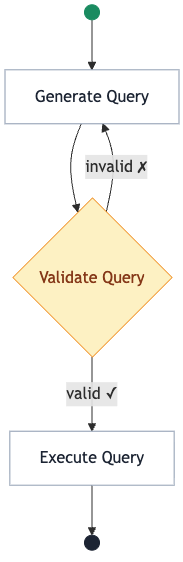
This is exactly where LangGraph demonstrates its strengths. The workflow of the SPARQL agent in Factory Buddy follows a clearly defined graph (described here in a simplified form):
- Generate query: The LLM creates a SPARQL query based on the user’s question.
- Validate query: The generated query is checked for syntactic and semantic correctness.
- Conditional edge: If the query is valid, the workflow continues. If not, it returns to step 1–with the error feedback added as additional context.
- Execute query: The validated query is executed against the knowledge graph.
- Prepare result: The raw output is transformed into an understandable answer.
What may appear straightforward at first would be significantly more complex to implement without LangGraph. The validation loop with automatic retries, the typed state, the error counter, and the conditional branching–all of these capabilities are available out of the box instead of requiring custom development.
And this is only one of several agents within the system. Factory Buddy uses a multi-agent architecture: An orchestrator agent determines, based on the incoming question, which specialized sub-agent is best suited for the task–whether that is the SPARQL agent for structured data, a retrieval agent for document search, or an agent for factory planning. We model this orchestration with LangGraph as well, using subgraphs–essentially graphs that are embedded within other graphs.
Especially in the context of a research project, the explicit graph structure provides significant value: it makes workflows transparent and traceable. In an environment where neurosymbolic AI is being explored–the combination of language models with ontology-based knowledge–transparency is not a nice-to-have feature; it is a fundamental requirement.
Beyond the Basics: What Else Can LangGraph Do?
Beyond the fundamental concepts, LangGraph offers a range of features that are particularly relevant for production-grade applications:
Checkpointing: The state of an agent can be persisted–for example, in a PostgreSQL database. If the agent crashes or the server restarts, it can resume exactly where it left off. In Factory Buddy, we use this for thread-based conversation history, ensuring that each user has their own isolated conversation context.
Streaming: Responses can be streamed to the frontend token by token instead of waiting for the complete answer to be generated. This makes the interaction with the assistant feel significantly faster and more responsive.
Human-in-the-Loop: At predefined points, the agent can pause and wait for human input–for example, for approval or correction. In manufacturing environments, where decisions can have real-world consequences, this is not just a convenient feature; it is a necessity.
Subgraphs: Complex agents can be composed of smaller, reusable graphs–just as our multi-agent architecture demonstrates.
Debugging and Observability: Thanks to the explicit graph structure, every step can be traced, logged, and visualized. In the GENIUS project, we integrate Langfuse as a tracing solution and Grafana for monitoring purposes.
Conclusion: Structure Instead of Hope
AI agents are fascinating. But fascination alone is not enough when the goal is to build reliable software. LangGraph provides the tools needed to transform an impressive yet unpredictable language model into an agent that is traceable, controllable, and robust.
Returning to our initial analogy: The highly intelligent but directionless person now receives a roadmap with LangGraph–complete with clearly marked stops, defined connections, and an emergency brake for situations where something goes wrong.
And the poem about butterflies? That can remain a hobby for their free time.