This is the first article in our XasCode series. Here we want to show why and how we use Docs-as-Code in our research project – using open-source tools only.


Why Docs-as-Code?
Whenever multiple developers work together on a project, exchanging information effectively is essential to the endeavor's success. While meetings and one-on-ones may be sufficient for day-to-day coordination, shared knowledge also needs to be stored in a way that's accessible to everyone, long-term. Whether it's personal notes, Miro boards, Confluence pages, or chat threads: every contributor is typically expected to pitch in and help build a shared hive-mind memory. The range of options for persisting documentation is virtually endless – but that individual freedom carries a risk: over time, numerous disconnected storage locations tend to spring up across the project. Depending on each contributor's motivation, these can end up at wildly different levels of detail. Of course, in most cases, shared repositories, formats, and standards for documentation get defined upfront. But who reliably and permanently enforces compliance with those agreements? How can we make sure that what the documentation claims actually holds true in the implementation? Are we sure that documentation and code won't drift apart in the long run?
These are the same questions we asked ourselves at the start of our research project, GENIUS. The added constraint: the answer had to be found in open-source territory.
Our Open-Source-Docs-as-Code-Stack
Why Open Source?
As part of our research project, we wanted to build our toolkit to be as independent and cost-effective as possible – partly to protect customer data as well. We also opted – very much in the spirit of digital sovereignty – for free, lightweight solutions that we host ourselves entirely. With the tools we use, we end up, with minimal effort, with a stripped-down alternative to paid services like Confluence – one that works just as well for professional projects as it does for hobby ones.
What Docs-as-Code Gets Us
The core of the approach is quick to explain: we treat documentation like source code. It lives as plain text in the same repository as the implementation it describes, and it goes through the very same processes. What at first looks like a mere storage decision ends up changing a surprising amount.
First, documentation becomes version-controllable. Every change has an author, a timestamp, and – ideally – a commit message explaining why it was necessary. This lets us trace how a concept evolved over months, and roll back to an earlier state whenever needed. Because docs and code live in the same branch, every feature branch comes with its own matching documentation state: a release tag doesn't describe what we planned for the future, but what actually existed at that point in time.
Next, it becomes reviewable. A change to the architecture documentation comes in as a merge request, just like a code change, which means it gets a second pair of eyes. Anyone who refactors an interface without touching the corresponding description has to answer for it in review. That's no guarantee against the drift we described at the outset, but it's at least a place where it gets noticed.
And finally, it becomes automatable. Whatever lives in version control can be touched by a pipeline: built, published, checked for dead links, linted against style rules. The finished website doesn't come into being because someone remembered to update it, but because someone pushed something. We'll show exactly what that looks like for us further down.
Which Code as Docs?
The first step toward that is settling on a shared language. Alongside the natural language – which for technical documentation we generally fix as English – this also includes deciding on a common markup language. There are plenty to choose from, each more or less popular depending on the project's ecosystem. Although RestructuredText or Markdown are the usual suspects in the Python world, which our research project is also part of, we opted for AsciiDoc on this project, since among the especially documentation-happy Pentacornians it's practically a second native tongue. With this choice, the feature-rich AsciiDoctor suite gives us a solid foundation for generating documentation in various output formats. That way, plain text files with the .adoc extension become, right there in version control, the single source of truth for information exchange.
From Text Files to Finished Documentation
The path from our text files to the finished website – where we can pull up nicely formatted, versioned documentation – is, of course, a long one. Luckily, our open-source tool belt has a few shortcuts to offer. Looking at AsciiDoc's own documentation, we found that its generation relies on the Antora framework. For our project, too, Antora can build static HTML pages with a configurable design straight out of the documentation held in (if needed, multiple) Git repositories. Since one of our project partners provides us with a GitLab instance for the research project, we go straight for GitLab Pages to host the static website Antora generates. That makes it easy for us to define a pipeline that builds and publishes our documentation.
pages:
  stage: deploy
  rules:
    - if: '$CI_PIPELINE_SOURCE == "push"'
      changes:
        - docs/**/*
        - antora-playbook.yml
        - .gitlab-ci.yml
    - when: never
  interruptible: true
  script:
    - antora generate --fetch --redirect-facility=gitlab --to-dir=public antora-playbook.yml
  artifacts:
    paths:
      - public
.gitlab-ci.yml (excerpt)
Bonus: Diagrams-as-Code with or without Kroki
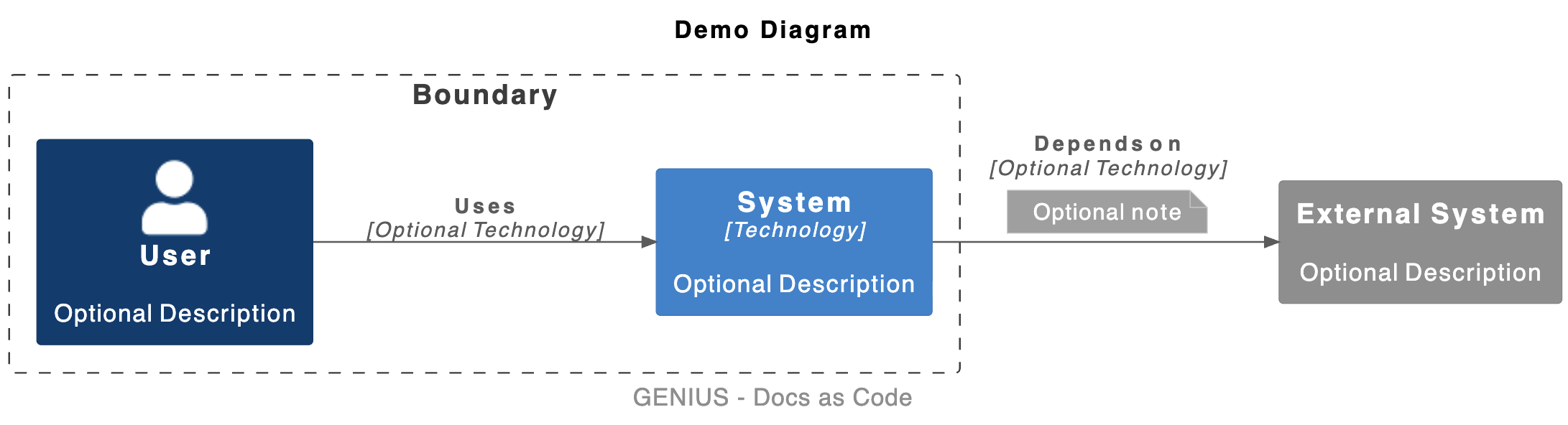
Worth mentioning at this point – though it doesn't get its own article, given its rather small role in the overall project – is Diagrams as Code. A very handy service here is Kroki, available both as a web API and as a Docker container. Kroki speaks the most common diagram languages and, from plain text files, often produces (depending on how much effort you put in) genuinely beautiful SVGs that we can embed directly in AsciiDoc. The downside: if you want to make a quick change, you can't just drag colorful boxes around. That's where
Flowchart Maker & Online Diagram Software comes in, though, which also has a VSCode plugin. You simply create a file with the .drawio.svg extension, Flowchart Maker & Online Diagram Software gives you a slick GUI for it, and writes SVG under the hood – strictly speaking, "as Code" too, if you want to look at it that way.
Interaktive Dokumentation with Jupyter-Notebooks
In our project, using Jupyter notebooks has also proven extremely valuable – both for experimenting and for documenting the insights gained along the way. Jupyter notebooks are JSON files that the IDE renders as a development tool. Within the notebooks, code can be run interactively cell by cell, with Markdown rendered right alongside it. It's hard to get documentation any closer to the code than that. The documentation produced this way is interactive and therefore highly illustrative, since concepts and findings can be directly traced through and tried out hands-on.
Docs-as-Code as the Panacea for Information Exchange
Ever since we started using Docs-as-Code, there haven't been any communication issues in the project context. Even when contributors leave the project, no information gets lost anymore, since everyone knows exactly where to find what.
Of course, that's a complete lie.
The goal of this article isn't to present Docs-as-Code as something it's not. As long as human authors still have their trigger-happy typing fingers in the mix, mistakes and misunderstandings obviously can't be ruled out. Ultimately, it remains everyone's individual responsibility (and, when done right, also the responsibility of a second pair of eyes) to ensure documentation lives up to the standards it set for itself. Bringing AI into the mix doesn't make that any easier. Although all XasCode approaches are very LLM-friendly, documentation that's been quickly auto-generated in particular should be reviewed with extra care. After all, our machine helpers have learned from the best when it comes to bad documentation – and they're more than happy to make up new facts on top of it.
In my opinion, far more valuable than any technical aid when it comes to documenting is having the right mindset. Peter Naur (yes, the same Naur from Backus-Naur) viewed programming as building a theory about the problem and its solution (https://pages.cs.wisc.edu/~remzi/Naur.pdf). Source code, in this view, is just one of the artifacts that emerges along the way. He recognized that even the best documentation can't fully carry over the theory that took shape in the original developer's head. To truly understand a complex system, then, experience and a solid grasp of the code are what really matter. Interestingly, this is exactly where the connection to "Clean Code" comes in: the code itself should also enable the next developer to build as coherent a theory of the system as possible.
So clearly, we haven't reached the end of our journey yet when it comes to figuring out how we, as authors, can capture our ideas as traceably as possible. We at pentacor still have a few more tricks up our sleeve for making our code cleaner too – and, who'd have guessed, with even more XasCode tricks. But more on that later.